
Why Interactive Dashboards Matter More Than Asking AI Directly for Daily Decisions

By Dithanon Khrutmuang · Power Ladder
Figure 1. Start purchasing decisions with the relevant information. AI-generated concept illustration, not a real client screen.
At a Snowflake event in Thailand, I had a chance to speak with the head of Data & AI at a fast-food company. I will call him A. The name is a pseudonym, but the conversation really happened.
I asked how he used Snowflake to manage ingredients delivered to individual branches, particularly a core ingredient like chicken. I was not trying to show that I knew more than he did. I wanted to exchange ideas about applying Snowflake to business.
A explained that Snowflake allowed people across the organisation, including procurement, to ask AI when they had questions about managing ingredients.
Keep that phrase in mind: “Ask when you have a question.”
For decisions that have to be made every day, I think we should start here.
When the chicken procurement team opens the system each morning, they should immediately see how much usable stock remains, how far it covers the production plan, and how much additional stock they should consider ordering today.
If every morning still begins with typing “What should I know today?” into AI, I believe we can do more to design information around the people doing the work.
From A's description, I understood that users mainly relied on chat with Snowflake CoWork. The question I want to explore is this: if there is no screen that prepares the important information around each team's decisions, a gap remains between “being able to access data” and “being able to use it in daily work.”
SNOWFLAKE COWORK · Screenshot supplied by the author
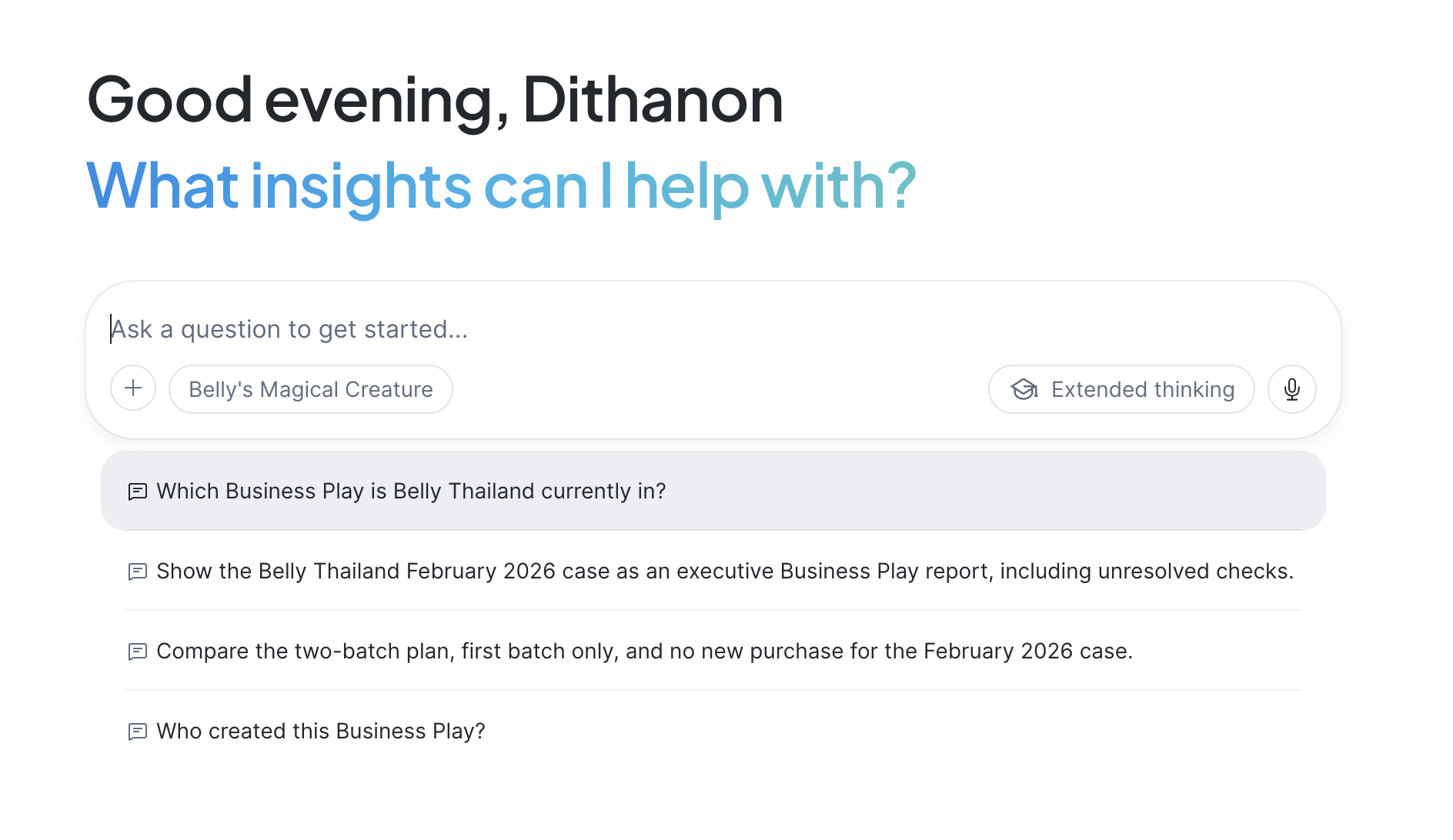
Figure 2. The Snowflake CoWork home screen includes a question box and suggested questions about Belly Thailand. This is an example supplied by the author, not a screen from A's company.
Recurring decisions should not depend on how many questions someone remembers to ask today
Suppose procurement asks AI, “How much chicken is in the warehouse?” Even a correct answer does not necessarily provide enough information to place an order.
The team also needs to know which stock has passed quality checks, which quantities are reserved for production, when incoming deliveries will arrive, and how much usable shelf life remains in each lot. If the questions are incomplete, the necessary information may never be considered together.
There is also a quieter problem. If shared definitions have not been established, two employees asking about the same subject in different words may receive figures based on different definitions. One might mean “stock physically in the warehouse”; the other might mean “stock available for use after reservations.” A meeting can then be spent arguing about which number is correct instead of making a decision.
Dashboards can have the same problem. Both the screen and AI therefore need shared definitions. Snowflake supports Semantic Views for defining business concepts, data relationships and common metric calculations. 1
Let me put this simply. For inventory, we should distinguish “stock in the warehouse,” “stock available for use,” and “goods ordered but not yet received,” and specify how each is calculated. Incoming goods are not goods that can be picked and used today. If we include incoming deliveries to assess future availability, that should be a separate metric with an explicit time horizon and assumptions.
When these definitions are established from the beginning, everyone in the meeting understands what the figures mean. That is an important role for Semantic Views in aligning data with business context. Shared definitions still need to be developed further through analysis of alternatives and business judgment before they can guide a decision.
For me, this is an important foundation for developing data into business strategy, or what we call Business Play at Power Ladder: helping executives see the opportunity, consequences and business readiness before choosing how to act.
This reminds me of The Checklist Manifesto by Atul Gawande, which discusses the role of checklists in complex work. I see a well-designed dashboard serving a similar purpose: keeping important considerations consistently visible, without relying entirely on the user's memory. 2
In interface design, Nielsen Norman Group explains Recognition over Recall: making information and options visible reduces the need to retrieve them from memory. This supports putting important information in view. It does not prove that every dashboard is better than AI chat for every task. 3
Put simply, chat used one question at a time still requires the user to initiate each question, while a well-designed dashboard displays the matters that need attention. With timely data and appropriate criteria, the system can flag a situation for review before it escalates. Status descriptions should accompany colour signals.
For procurement, the screen should be designed around the decisions the team needs to make.
Production, finance and procurement do not need identical home screens. They do need shared definitions for the same data and metrics, with access governed by the permissions assigned to each user.
Figure 3. Different teams need different starting screens, with shared data definitions.
The interaction I want is the ability to test alternatives before making a real decision
A dashboard showing only historical purchasing charts does not fully address this need. For this task, I want interaction to go beyond filtering data or drilling into details.
I want users to compare a single large order with split deliveries or a purchase from a backup supplier. How would each option affect production continuity, cash payments and the risk of ingredients going to waste?
Figure 4. Considerations for comparison, not a ranking or a calculated purchasing recommendation.
When an assumption changes, such as higher planned production or a delayed delivery, the system should recalculate the consequences using an agreed model. It should also show data sources, update times and the limits of its recommendations.
STREAMLIT DEMO · Synthetic data · Not connected to Snowflake
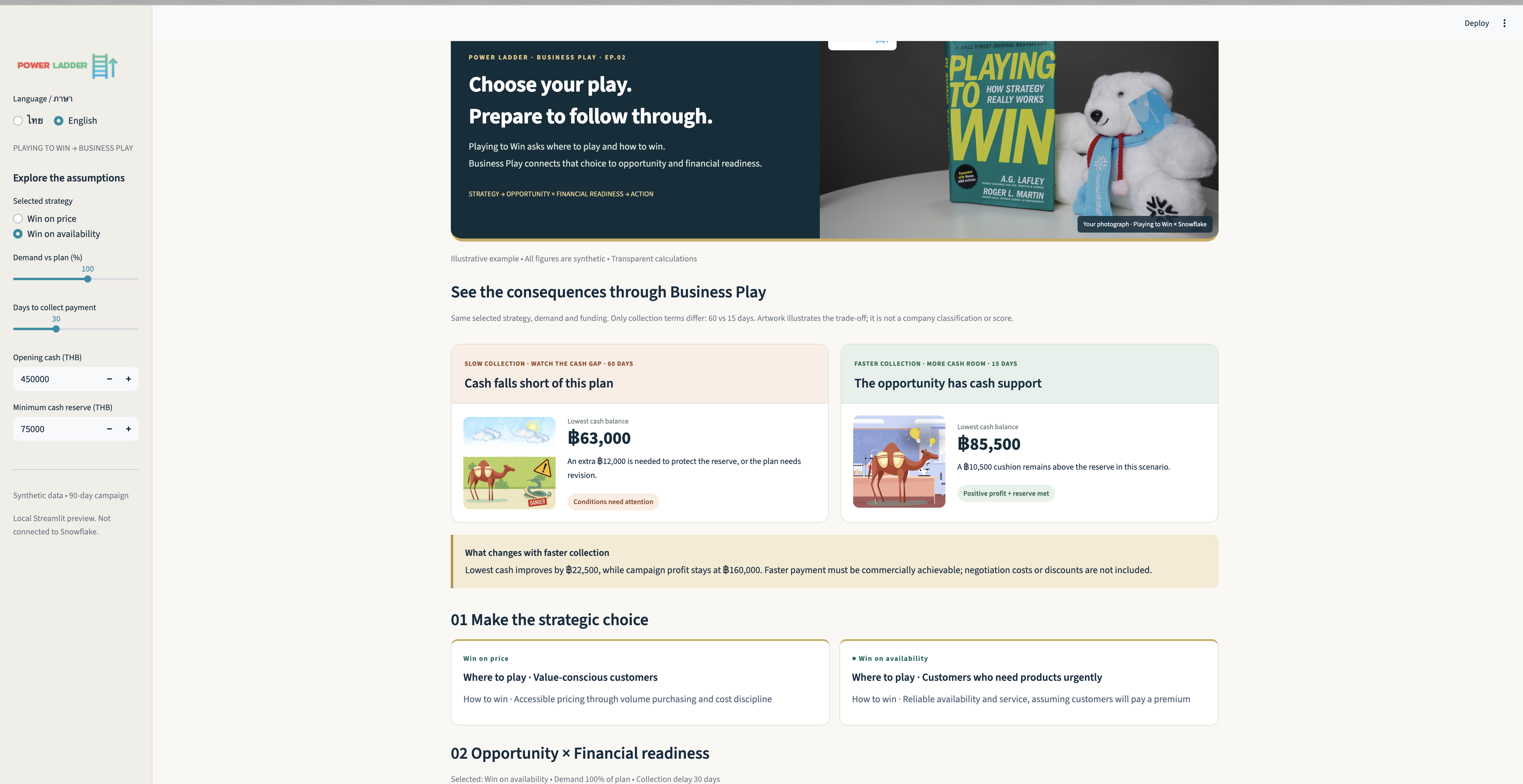
Figure 5. This Business Play demo built with Streamlit includes controls for demand, collection timing and opening cash, alongside comparisons of financial readiness. The screen explicitly identifies the data as synthetic and the app as a local Streamlit preview that is not connected to Snowflake.
In my Business Play approach, the key is to consider business opportunity alongside financial readiness. Buying more may support additional sales, but we also need to see when cash will leave the business and whether the business can carry that commitment.

Figure 6. Original Calculated Ambition artwork from Power Ladder. The article applies the underlying idea without calculating a score.
Where does AI chat belong?
AI chat is valuable for exploring new questions, investigating the causes of an anomaly, or examining a situation that has not been prepared on the dashboard.
For daily work, I suggest opening the dashboard, seeing the situation that needs attention, and then asking AI, “What is driving the increase in demand?” or “What alternatives do we have if this supplier is late?” The user does not have to begin by working out what to ask today.
Snowflake CoWork itself can analyse information and take actions through connected tools. It also offers Automations to run recurring questions on a schedule and deliver reports. It should therefore not be treated as something that can only wait for a person to ask. The issue is how an organisation designs those capabilities around its users' work. 4 5
SNOWFLAKE · AGENT PREVIEW · Screenshot supplied by the author
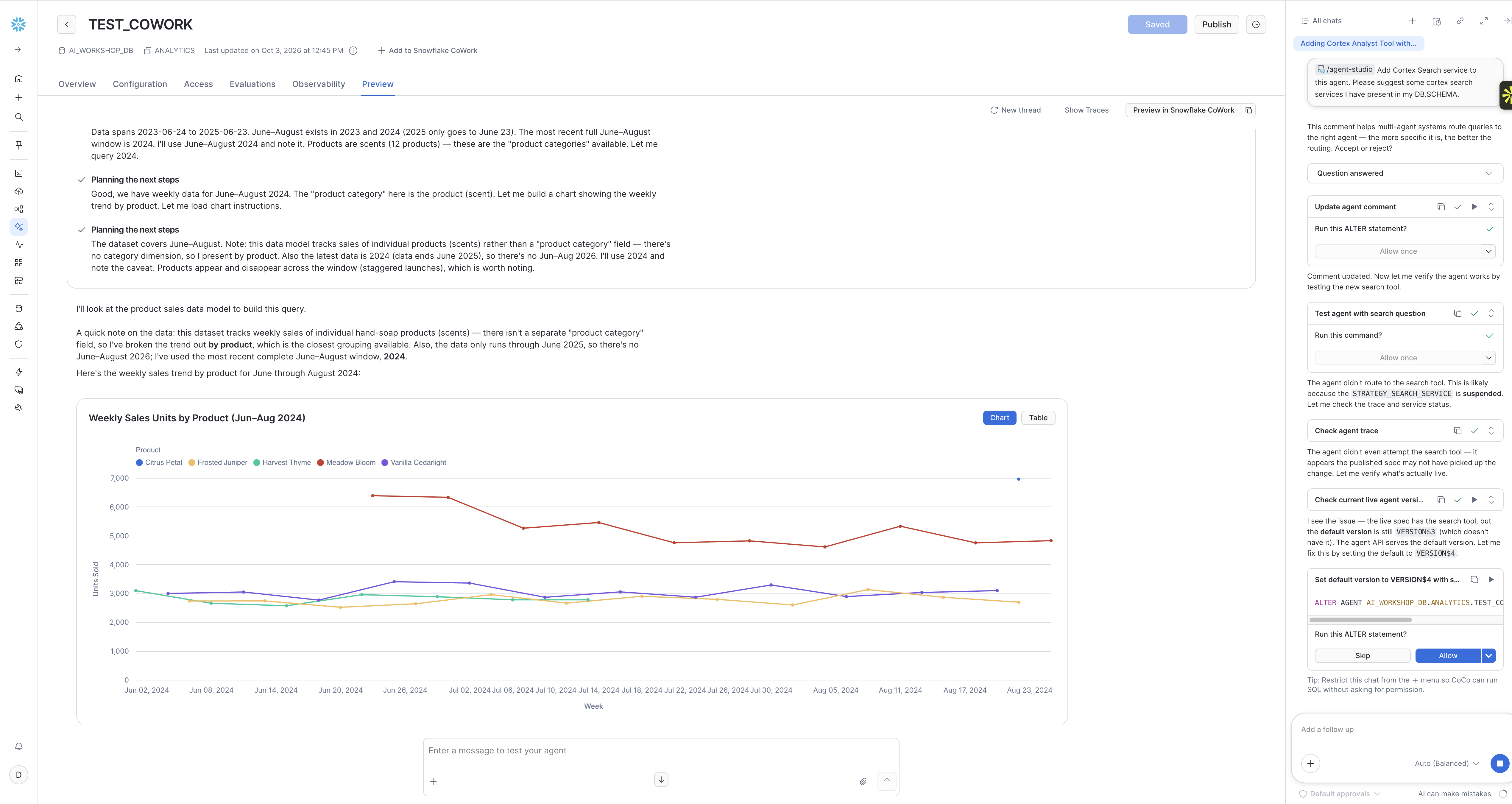
Figure 7. The Preview screen for the TEST_COWORK agent in Snowflake shows an answer alongside weekly sales for June–August 2024, as labelled on screen. This demonstrates that chat can present charts too. It does not show an analysis of chicken stock at the company in this story.
For task-specific screens, Streamlit in Snowflake supports building and sharing interactive data apps that use data in Snowflake. The quality of any purchasing recommendation still depends on the data, model and business rules supplied to it. 6
Answer these three questions before building a dashboard
Who is the user, and what decision do they need to make every day?
Which figures support that decision, and do all teams using them agree on their definitions?
What criteria indicate that someone should investigate or act? For example, less than three days of material coverage might trigger a review. That figure is only an illustrative threshold. Lead times, incoming deliveries, the production plan, shelf life and financial constraints must be considered before deciding to order.
With answers to these three questions, we have a starting point for designing a dashboard as a decision tool. AI chat can then extend the analysis from the situation already visible on screen.
Figure 8. The daily workflow proposed by the author. Chat and automated reports can also initiate a review.
If your procurement team opened the system today without typing a question into AI, would they already see enough information to make the day's important decisions?
References
Sources checked on 15 October 2026. The company example comes from the author's conversation and is a paraphrase, not a transcript. The author has not audited that organisation's system configuration.
Screenshot sources
The three screenshots were supplied by the author for this article. The original images are used without changing the on-screen text or data. As stated in the image, the Streamlit app uses synthetic data and is not connected to Snowflake.


Comments